
Key takeaways
- Three 5.5-digit digital bench multimeters for engineering workbenches, compared on DC accuracy, reading speed, memory and interfaces for design and debug work.
An engineering workbench punishes a multimeter differently from a lab or a classroom. It sits powered for weeks, gets grabbed mid-debug with one hand, and its readings feed decisions about whether a board spins again or a design ships. What you are really choosing is a 5.5-digit partner for design verification: how trustworthy its DC readings are, how fast it samples when you are hunting an intermittent fault, and how easily it hands data to the PC sitting next to it.
All three instruments below are 5.5-digit bench meters with verified Amazon US listings. They separate cleanly: one value-focused all-rounder, one connectivity-heavy model with an internal reading buffer, and one premium nameplate with an OLED display and deep memory. None of them is a handheld in a charging cradle; each is a mains-powered instrument built to live on the bench full time, warmed up and ready whenever a board lands in front of it.
Quick Picks
As an Amazon Associate we earn from qualifying purchases.
| Product | Best for | Key spec from title |
|---|---|---|
| Rigol DM3058E | Value-focused design and debug benches | 5.5 digit, up to 123 readings/s, USB and RS232 |
| BK Precision 5492C | Benches that log and automate measurements | 5.5 digit, 120,000 counts, 0.010 percent basic DC accuracy |
| Keysight 34450A | High-throughput verification work | 5.5 digit, OLED dual display, up to 190 readings/s |
How to Choose
Read the DC accuracy line before anything else
For design verification, basic DC voltage accuracy is the figure that decides whether a measurement settles an argument or starts one. In this class you will see numbers between roughly 0.010 and 0.015 percent on the listings — small differences on paper that matter when you are checking a reference voltage or validating a regulator against its datasheet limits. Treat any accuracy claim without a stated function and range as marketing, and prefer meters whose listings name the figure plainly. Resolution without accuracy is just a longer row of digits changing. That discipline — comparing the same function, on the same terms — is what makes the shortlist below meaningful.
Reading speed is a debugging feature, not a luxury
When a fault appears for half a second at power-up, the meter’s sampling rate decides whether you see it. Bench meters in this group run from a little over a hundred readings per second to nearly two hundred, and the faster models pair that speed with internal memory, so a burst of readings can be captured and reviewed instead of watched live. If your work involves production-style checks, inrush behaviour or intermittent dropouts, weight speed and buffer depth heavily; for slow, deliberate characterisation, they matter less than stability and accuracy. Built-in statistics — minimum, maximum and average over a run — extend that capture into a quick characterisation tool without any PC involvement.
Interfaces decide whether data leaves the bench
Sooner or later every engineering bench wants measurements inside a spreadsheet, a test script or a report. The listings here offer combinations of USB, RS232 and LAN, plus SCPI-style remote control on the more connected models. Decide which port your bench PC and software expect before you order — an RS232-only meter is fine beside a legacy setup and awkward beside a modern laptop dock. Internal storage is the other half of the equation: a meter that buffers thousands of readings can run a capture untethered and upload afterwards. A meter that speaks your software’s language out of the box saves an afternoon of adapter hunting and driver archaeology.
Four-wire resistance and the second display earn their space
Two everyday bench tasks separate these meters from cheaper ones. Four-wire (Kelvin) resistance measurement removes lead resistance from the reading, which is how you measure milliohm shunts, connector contacts and PCB trace runs honestly; all serious candidates for this role should offer it. A dual display is the quieter win — voltage and current, or a reading and its statistics, visible together while a prototype runs. If you routinely watch a rail while adjusting a load, that second readout saves a second instrument. Both features cost little at purchase time and are effectively impossible to retrofit later without buying another meter.
The 3 Best Options
Rigol DM3058E

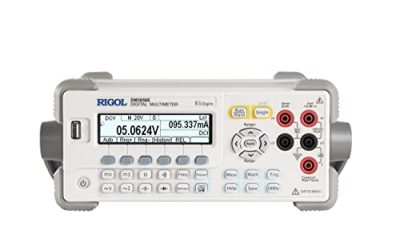
The DM3058E is the pragmatic engineer’s default: 5.5 digits, sampling up to 123 readings per second, and a dual display that keeps two parameters in view during bring-up. It covers the full bench repertoire — DC and AC voltage and current up to 1000 V and 10 A, two-wire and four-wire resistance, capacitance, frequency, temperature and diode test — and connects over USB and RS232 for logging to a PC. It lacks the LAN port and internal buffer depth of the BK Precision below, but as a permanently parked design-and-debug meter it has the essentials in the right places. Its plain front-panel layout speeds up daily use.
Specs
- Resolution: 5.5 digits
- Measurement speed: up to 123 readings per second
- Display: dual display
- Maximum ranges: 1000 V, 10 A
- Functions: DC/AC voltage and current, 2-wire and 4-wire resistance, capacitance, frequency, temperature, diode test, continuity
- Interfaces: USB, RS232
- Item model number: DM3058E
Best for: Individual engineering benches doing board bring-up, regulator checks and everyday design verification.
Watch out for: No LAN interface and a comparatively modest feature set for automation — scripted multi-instrument rigs should look at the 5492C.
ASIN: B00KBZK1QW
BK Precision 5492C

The 5492C is the connectivity and logging specialist of the three. Its headline figures — 5.5 digits, 120,000 counts, True RMS AC and a basic DC accuracy of 0.010 percent — are backed by the bench features engineers actually automate with: USBTMC, LAN and RS232 interfaces, an internal buffer holding 10,000 readings, and four-wire resistance for low-value work. A 1000 V / 10 A input envelope covers power-adjacent tasks. If your workflow involves scripted sweeps, soak tests or leaving the meter to record a prototype’s behaviour overnight, this is the instrument structured for that life. Trend and statistical views let you inspect logged behaviour on the meter before exporting anything.
Specs
- Resolution: 5.5 digits, 120,000 counts
- Basic DC voltage accuracy: 0.010 percent (100 ppm)
- AC measurement: True RMS
- Resistance: 2-wire and 4-wire
- Maximum ranges: 1000 V DC, 10 A
- Internal buffer: 10,000 readings
- Interfaces: USB (USBTMC), LAN, RS232
- Item model number: 5492C
Best for: Automated test setups, long logging runs and benches that treat the meter as part of a system.
Watch out for: The automation depth is wasted on purely manual, occasional use — simpler benches may prefer the Rigol’s straightforwardness.
ASIN: B0BHVV7SHN
Keysight 34450A

The 34450A brings the premium nameplate of the group and the hardware to justify a look: a crisp OLED dual display that stays legible at bench angles, sampling up to 190 readings per second — the fastest here — 50,000 readings of internal memory, and basic DC accuracy of 0.015 percent. USB and RS232 cover PC connection for data logging and control. It suits engineers who verify designs against tight datasheet windows all day and want the reading quickly, clearly and stored. What it does not offer is LAN, so network-centric rigs should weigh the BK Precision first. It also suits benches used in short, frequent bursts between other tasks.
Specs
- Resolution: 5.5 digits
- Display: OLED, dual display
- Basic DC accuracy: 0.015 percent
- Measurement speed: up to 190 readings per second
- Internal memory: 50,000 readings
- Interfaces: USB, RS232
- Item model number: 34450A
Best for: High-throughput verification and engineers who read the meter constantly and want the clearest display in the class.
Watch out for: No Ethernet/LAN, and it carries the premium positioning of its brand — budget-led benches get more raw connectivity per spend from the 5492C.
ASIN: B00C6ARFCI
Which One Fits Your Situation
You are setting up a personal design bench
The DM3058E covers the role with the least friction: full measurement set, four-wire resistance, dual display and PC logging over USB. It is the meter to leave powered beside the oscilloscope for bring-up, debug and the hundred small verifications between schematic and layout.
Your bench runs scripted or overnight tests
Choose the 5492C. LAN plus USBTMC plus RS232 means it joins almost any control setup, and the 10,000-reading buffer with 0.010 percent DC accuracy supports soak tests and characterisation runs you can trust in the morning report. Its four-wire resistance mode also keeps low-value checks honest during those long unattended runs.
You verify against tight datasheet limits daily
The 34450A’s fast sampling, deep memory and OLED dual display are built for repeated pass/fail checking at speed. When the day’s work is measuring many boards or many rails against narrow windows, its throughput and readability repay the premium positioning. The 50,000-reading memory means a full day of checks can be reviewed afterwards rather than watched live.
You are equipping several benches at once
Standardise. A mixed fleet of meters multiplies leads, software drivers and training overhead, so pick the model that matches your most common task — usually the DM3058E for general benches, the 5492C where automation is planned — and deploy it everywhere. Identical instruments also make readings comparable between benches, which matters when two engineers debug the same design in parallel.
Common Mistakes
- Buying a 5.5-digit meter for its digit count, then discovering the project’s real need was logging memory or a LAN port.
- Assuming every bench meter does four-wire resistance — verify it on the listing before planning milliohm measurements or current-shunt checks.
- Ignoring the interface generation: RS232-only meters need adapters and driver patience on modern bench PCs, and that friction shows up every single day.
- Comparing accuracy figures across different functions or unspecified conditions instead of the basic DC voltage specification.
- Leaving the meter’s input ratings unchecked before probing mains-adjacent or high-energy circuits on a workbench.
Frequently Asked Questions
Is 5.5 digits enough for engineering design work?
For the great majority of bench verification — rails, references, sensor outputs, regulator tolerances — yes. A 5.5-digit meter with honest accuracy resolves far beyond the tolerances of the components being checked. Calibration work and precision analogue design are the usual reasons to step up to 6.5 digits. Most benches standardise on this class for that balance.
What does four-wire resistance measurement actually fix?
It removes the resistance of the test leads and contacts from the result by separating the current path from the sensing path. Below a few ohms, lead resistance can exceed the value you are trying to measure, so four-wire technique is the difference between a real milliohm reading and a guess. All three meters in this guide offer four-wire measurement.
Which interface matters most: USB, RS232 or LAN?
The one your software and bench layout already speak. USB suits a single meter beside one PC, RS232 appears on older instruments and industrial gear, and LAN wins when the meter sits in a rack, is shared, or joins scripted multi-instrument tests. The 5492C in this guide offers all three. Adapters exist, but each adds a failure point.
Do bench meters need calibration for engineering use?
They hold calibration far better than handhelds in daily abuse terms, but design decisions that ship product deserve periodic verification against a known reference. If your readings feed compliance or customer-facing specifications, follow the manufacturer’s calibration interval rather than trusting the display indefinitely. Keep the calibration date recorded alongside the bench’s other service records.
FAQ
Is 5.5 digits enough for engineering design work?
What does four-wire resistance measurement actually fix?
Which interface matters most: USB, RS232 or LAN?
Do bench meters need calibration for engineering use?
More from Amazon
Programs that pair well with the guide above. Offers and eligibility are set by Amazon and may change.
Free shipping on eligible items, Prime Video and more. Eligible new members can start with a free trial.
Start a Prime free trialAudiobooks and podcasts to listen to on the go. Eligible new members can start with a free trial.
Try Audible freeAd-free music streaming. Eligible new subscribers can start with a free trial.
Try Music Unlimited freeA free business account with business pricing and bulk-buying tools for work, shop or home office.
Create a business accountAs an Amazon Associate we earn from qualifying purchases.






Write Your Review
No reviews yet. Be the first to share your experience!