
Key takeaways
- Case design: Tempered-glass panels, a showcase layout or a clean, minimal front all give a different look. Decide whether you want a statement piece or something that blends in.
- Lighting you can control: RGB is great until it clashes with your room. Look for builds where lighting can be changed or turned off through software.
- Size: Compact towers save desk space, while large cases show off more of the hardware but need room.
- Standard parts: Proprietary motherboards can look tidy but limit future upgrades, so check reviewer notes on expandability.
- Availability: Some builds go backordered or change parts mid-run. Confirm the exact configuration on the seller page.
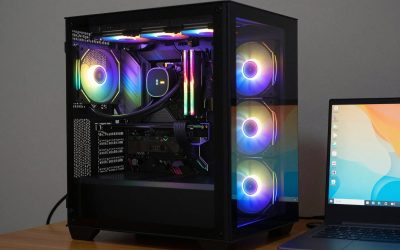
If you are shopping for the best looking gaming PC, a spec sheet only tells half the story. A desk setup is a room’s focal point, and a glass-fronted tower with tidy cabling can sit next to your decor instead of fighting it. This guide rounds up six prebuilt gaming rigs that are known for a design-forward case, and it doubles as a shortlist if you are comparing the best looking gaming PCs before you commit to a gamer PC for your desk.
A quick note on method: we did not test these machines hands-on. The picks below are based on manufacturer-published specifications and the feedback of professional reviewers, and where a detail was not confirmed we say nothing about it. Prices are approximate ranges collected in October 2026 and change often, so check the current listing before you buy. Configurations also vary a lot between retailers.
What to Look For in a Good Looking Gaming Rig
- Case design: Tempered-glass panels, a showcase layout or a clean, minimal front all give a different look. Decide whether you want a statement piece or something that blends in.
- Lighting you can control: RGB is great until it clashes with your room. Look for builds where lighting can be changed or turned off through software.
- Size: Compact towers save desk space, while large cases show off more of the hardware but need room.
- Standard parts: Proprietary motherboards can look tidy but limit future upgrades, so check reviewer notes on expandability.
- Availability: Some builds go backordered or change parts mid-run. Confirm the exact configuration on the seller page.
Skytech O11 Vision
This build uses the Lian Li O11 Vision showcase case, described as glass-forward with eight fans and available in white or black. The listed configuration pairs a Ryzen 7 9800X3D with a GeForce RTX 5070 Ti, 32GB DDR5-6000 and a 1TB Gen4 NVMe SSD, cooled by a 360mm liquid cooler with an 850W Gold power supply. Expect roughly $2,200 to $2,500.
Pros: a striking showcase case, a liquid-cooled X3D gaming CPU, room to upgrade. Cons: one reviewer notes that a showcase case trades some intake for glass, some SKUs use Wi-Fi 5 and slower RAM, and we found no in-depth independent review of this build. Best for: people who want the PC to be the centerpiece of the desk.
Corsair Vengeance i7600
Corsair builds this model in its 3500X mid-tower, which has glass panels and six RS120 ARGB fans. The listed configuration has a Core Ultra 5 250K Plus, a GeForce RTX 5060 Ti, 16GB of RAM, a 1TB NVMe SSD and a 240mm Nautilus liquid cooler, at roughly $1,800 to $2,200. Corsair lists a 2-year warranty for it, and Tom’s Hardware praised the same warranty on an earlier i7600.
Pros: a premium-looking name-brand case with a liquid cooler. Cons: only 16GB of RAM, and the Corsair page showed it backordered, shipping late October to early November 2026, so availability may differ by the time you read this. Best for: buyers who want an attractive glass-and-ARGB gamer PC at a mid-range price.
Alienware Aurora ACT1250
The Aurora has a black chassis with a clear side panel and is described as about 40 percent smaller than the older Aurora R15. The RTX 5070 trim lists a Core Ultra 7 265F, 32GB of memory, a 1TB NVMe SSD, a 240mm liquid cooler and a 1000W power supply, for about $1,800 to $2,100. TechRadar rates its value 4.5 out of 5 and says it targets solid 1440p play.
Pros: compact, clear-panel design with liquid cooling. Cons: TechRadar flags a proprietary motherboard and limited expandability. Best for: anyone who wants a good looking gaming PC that does not take over the room.
ASUS ROG G700 (G700TF)
The G700 is described as having a dark finish, tempered-glass front and side panels, and plenty of RGB. This configuration lists a Core Ultra 7 265KF, an RTX 5070, 240mm liquid cooling and 32GB of RAM, around $2,000 to $2,300. Tom’s Hardware called it a compelling balance of performance and price, and the case has washable dust filters and tool-free side panels.
Pros: glass on the front and sides, easy maintenance. Cons: reviewers note thin rolled steel and an aging Wi-Fi 6 card, and the review we relied on is roughly 455 days old. Best for: fans of the full gaming-rig aesthetic who like a lot of glass and lighting.
NZXT Player Three
NZXT pairs its H6 Flow dual-chamber glass case with a Kraken Elite 360 RGB V2 liquid cooler. The listed build has a Ryzen 7 9800X3D, an RTX 5080 with 16GB, 32GB of RAM and 4TB of storage, roughly $3,800 to $4,000. GamesRadar said it had some of the best and quietest cooling of any prebuilt it tested, and NZXT discounts it often.
Pros: clean looks, strong CPU and GPU pairing, quiet cooling per GamesRadar. Cons: GamesRadar flagged slow SSD speeds on an earlier configuration, and the price is high. Best for: a tidy, high-end build that looks refined rather than flashy.
HP Omen Max 45L
This tower has tempered glass on both sides, synchronized RGB that can be disabled, and a radiator in a separate top “Cryo Chamber”. The reviewed configuration used a Ryzen 9 9900X3D, an RTX 5090 and 64GB of RAM, with a very wide price range of about $3,500 to $6,900 depending on the config. HotHardware reported excellent cooling and quiet running during gaming.
Pros: attractive design built on standardized parts. Cons: sparse I/O, limited SATA expansion, slow memory in the review unit, and criticism of HP’s software and bundled offers. Best for: a no-compromise, cost-is-no-object showpiece.
Frequently Asked Questions About the Best Looking Gaming PC
What makes a gaming PC look good? Mostly the case: glass panels, a showcase layout, tidy cable routing and lighting you can control. Matching the finish (black or white) to your desk setup also helps.
Is a good looking gaming PC worse at gaming? Not necessarily. These picks use mainstream CPUs and graphics cards, but a glass-heavy case can trade some airflow for looks, as one reviewer noted for the Skytech build. Check cooling notes before buying.
Are prebuilt gaming rigs worth it? They save build time and come with a single seller to deal with. Check the warranty on the exact listing, since terms differ by brand and configuration.
Can I turn the RGB off? It depends on the build. The HP Omen Max 45L is listed with RGB that can be disabled, while for the others we did not find confirmation, so check the seller page.


Write Your Review
No reviews yet. Be the first to share your experience!