
Key takeaways
- Fans included: The cheapest way to get RGB is a case that already includes ARGB fans. Check how many come in the box and where they sit.
- Glass and front panel: A tempered-glass side panel shows off the lighting. A mesh front helps airflow, while a glass front is more of a showcase design.
- Controller and motherboard headers: ARGB fans normally connect to a motherboard header or a hub, so confirm your board has a suitable header or that the case includes a controller.
- GPU and cooler clearance: Compare maximum GPU length with your card before ordering.
- Front I/O: Front USB-C is common now, but a few cases still skip it.
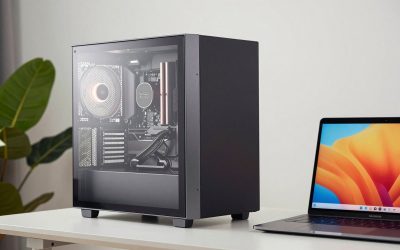
If you are hunting for the best RGB PC cases, the good news is that lighting no longer costs a fortune. Many of the best PC cases with RGB now ship with ARGB fans already installed, so you can get a glowing build without buying extra fans or LED strips. This guide covers six mid-tower cases for people who want the best PC cases for RGB lighting on a sensible budget, and it also works as a shortlist if you are comparing the best LED PC cases with lights before you buy.
A quick note on method: we did not test these cases hands-on. The picks below are based on manufacturer-published specifications and the feedback of professional reviewers, and where a detail was not confirmed we say nothing about it. All six are mid-tower cases in a similar price band, so none is a premium showpiece. Prices are approximate ranges and change often, so check the current listing before you buy.
What to Look For in the Best PC Cases With RGB
- Fans included: The cheapest way to get RGB is a case that already includes ARGB fans. Check how many come in the box and where they sit.
- Glass and front panel: A tempered-glass side panel shows off the lighting. A mesh front helps airflow, while a glass front is more of a showcase design.
- Controller and motherboard headers: ARGB fans normally connect to a motherboard header or a hub, so confirm your board has a suitable header or that the case includes a controller.
- GPU and cooler clearance: Compare maximum GPU length with your card before ordering.
- Front I/O: Front USB-C is common now, but a few cases still skip it.
Montech AIR 903 MAX
The AIR 903 MAX is a mid-tower with a fine mesh front and a tempered-glass side panel, supporting E-ATX, ATX, mATX and ITX boards. Published specs list four 140mm fans (three ARGB at the front, one PWM at the rear), a 400mm GPU limit, and 360mm radiator support at the front and top. It has front USB-C and comes in black or white. Expect roughly 69 to 85 dollars.
Pros: four 140mm fans included, strong radiator support, USB-C on the front panel. Cons: dust filters are listed only at the top and bottom, and the main review we relied on is about two years old. Best for: buyers who want RGB, airflow and room for liquid cooling at a low price.
Corsair 3200D RS ARGB
This ATX mid-tower comes with three 120mm RS120 ARGB fans and a tempered-glass side panel, in black, white or smoke. It supports ATX, mATX and ITX boards, takes GPUs up to 375mm, and fits 240, 280 or 360mm radiators at the front and top. Front USB 3.2 Gen2x2 Type-C is included, and it supports rear-connector (BTF) boards. Prices run about 64 to 80 dollars.
Pros: three ARGB fans included, BTF support, fast front USB-C. Cons: only one USB 2.0 Type-A port on the front, no vertical GPU mount, and CPU cooler clearance is a modest 165mm. Best for: first-time builders and white-build fans who want a name-brand case.
Phanteks XT Pro Ultra
The XT Pro Ultra pairs a mesh front with four 140mm DRGB fans (three at the front, one at the rear), pre-routed with daisy-chained cables. It accepts E-ATX through ITX boards, fits GPUs up to 415mm, and supports a 360mm radiator on top and 240mm at the front. Front USB-C is present. Roughly 75 to 85 dollars.
Pros: four ARGB fans, tidy pre-routed fan cabling, rear-connector board support, and fans that averaged under 900 RPM in Tom’s Hardware testing. Cons: no removable front fan filter, only two top I/O ports, and no cable grommets. Best for: people who want a quiet, well-lit case with E-ATX room.
Montech TG3 Panoramic
The TG3 is the showcase pick: a glass front and side wrap around a single 360mm ARGB side fan, plus a 120mm ARGB rear fan. It supports ATX, mATX and ITX boards, GPUs up to 430mm and front USB-C, and comes in black only. Expect about 55 to 65 dollars.
Pros: a striking panoramic look at a very low price, good CPU cooling and low noise in Tom’s Hardware testing, back-connect board support. Cons: limited cable management space, no 20Gbps Type-C, and the PSU shroud divides opinion. Best for: budget builders who care most about looks.
Lian Li LANCOOL 207
The LANCOOL 207 has a mesh front, tempered-glass side, and four fans: two 140mm ARGB at the front and two 120mm PWM fans that face the GPU. It supports ATX, mATX and ITX boards, GPUs up to 375mm, and radiators of 240 to 360mm on top. Front USB-C is included. Black sells for about 80 to 85 dollars, and white often costs more.
Pros: four fans with two aimed at the graphics card, strong cooling in reviews, good cable routing from its unusual layout. Cons: PSU length is limited to under 160mm, no rear-connector board support, and the front filter is sold separately. Best for: airflow-minded builders who want a modest amount of RGB.
DeepCool CH560
The CH560 includes four ARGB fans (three 140mm at the front, one 120mm at the rear) behind a mesh front, in black or white. It supports E-ATX through ITX, GPUs up to 380mm, and 360mm radiators at both the front and top. It has an integrated GPU support arm and front USB-C. Prices were reported around 100 to 130 dollars, launching at 130 and later nearer 100.
Pros: four ARGB fans, GPU support arm, flexible radiator options. Cons: front I/O offers just one USB-A plus USB-C, the hybrid side panel does little, and a front radiator reduces GPU space. Best for: white builds and liquid-cooled systems where the extra spend is acceptable.
Frequently Asked Questions
What are the best RGB PC cases for a small budget?
Based on the published price ranges, the Montech TG3 Panoramic (about 55 to 65 dollars), Corsair 3200D RS ARGB and Montech AIR 903 MAX are the lowest-priced picks here. Check current listings, since prices shift.
Do the best PC cases for RGB lighting include fans?
All six cases above list ARGB fans in the box, so you do not need to buy lighting separately. The number and size of fans vary, so compare the specs above.
Do I need a special motherboard for an RGB PC case?
ARGB fans usually plug into a motherboard header or a hub. Check your board manual for a compatible header, and confirm what controller your chosen case supplies before you order.
Are LED PC cases with lights worse for cooling?
Not by themselves. Airflow depends on the front panel, fans and layout. Mesh-front models like the AIR 903 MAX and LANCOOL 207 are built with airflow in mind, while glass-front designs like the TG3 favour looks.


Write Your Review
No reviews yet. Be the first to share your experience!