
Our Short List of 3

- Entry: touchscreen keypad, Apple Home Key, app, voice control
- Access codes: up to 100, schedulable in the app
- Connectivity: built-in Wi-Fi; Amazon Alexa, Google Assistant, Apple HomeKit
- Alarm: built-in alarm for forced-entry attempts

- Entry: backlit touchscreen, app, Auto-Unlock, voice control
- Access codes: up to 250, managed in the Yale Access app
- Connectivity: Wi-Fi Smart Module included (2.4 GHz), Bluetooth built in
- Door sensor: DoorSense included, reports open and closed status
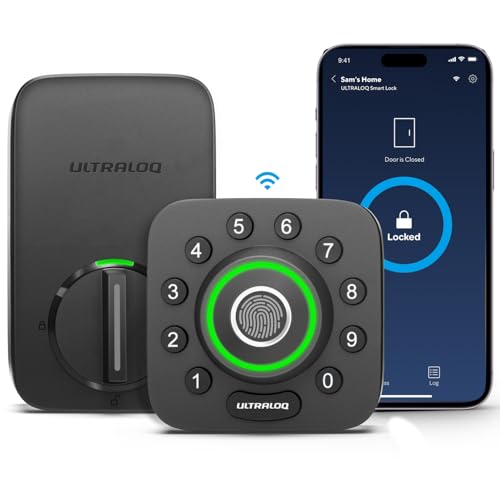
- Entry: fingerprint, anti-peep keypad, app, eKey, voice, 2 backup keys
- Capacity: up to 100 fingerprints; up to 50 user codes
- Connectivity: built-in Wi-Fi and Bluetooth; Alexa, Google Assistant, SmartThings, IFTTT
- Door sensor: included, enables auto-lock and door-ajar alerts
All 4 Picks at a Glance
| Product | Specs | Action |
|---|---|---|
| Schlage Encode Plus Smart Wi-Fi Deadbolt, Century, Matte Black |
| Check price on Amazon |
| Yale Assure Lock 2 with Wi-Fi, Satin Nickel |
| Check price on Amazon |
| ULTRALOQ U-Bolt Pro WiFi with Door Sensor |
| Check price on Amazon |
 August Wi-Fi Smart Lock (4th Generation), Matte Black |
| Check price on Amazon |
Key takeaways
- Compare five keyless smart locks with fingerprint readers, touchscreens, built-in Wi-Fi and app control, plus door fit and battery notes for each pick.
A smart lock replaces the daily key hunt with a code, a fingerprint or a tap of your phone, and it keeps a record of every entry while it does it. The five deadbolts below all lock and unlock without a traditional key in daily use, and each one manages guest access from an app, so a cleaner, a dog walker or a visiting relative gets a code that works only when you say it does.
The field splits along three lines. Entry style comes first: two picks lead with touchscreens, two lead with fingerprint readers, and one keeps your existing deadbolt hardware and adds smart control from inside. Connectivity comes next, since all five carry built-in Wi-Fi for remote control from anywhere, though the retrofit leaves the outside of the door untouched. Power is the third split: four run on AA batteries, one on a pair of CR123 cells.
As an Amazon Associate, we earn from qualifying purchases.
Quick answer
For most doors, the Schlage Encode Plus is the most complete pick: built-in Wi-Fi, a touchscreen, up to 100 codes and tap entry with an iPhone or Apple Watch. The Yale Assure Lock 2 suits households wanting 250 app-managed codes and a door sensor in the box. Fingerprint fans should look at the ULTRALOQ U-Bolt Pro WiFi or Kwikset Halo Touch, and renters should pick the August Wi-Fi Smart Lock.
The picks
Schlage Encode Plus Smart Wi-Fi Deadbolt, Century, Matte Black
- Entry: touchscreen keypad, Apple Home Key, app, voice control
- Access codes: up to 100, schedulable in the app
- Connectivity: built-in Wi-Fi; Amazon Alexa, Google Assistant, Apple HomeKit
- Alarm: built-in alarm for forced-entry attempts
The Encode Plus is Schlage’s premium deadbolt, built around a touchscreen and a zinc body with no key cylinder at all, so there is nothing to pick or bump. Entry runs through the touchscreen, the Schlage Home app, voice assistants or Apple Home Key, which unlocks the door with a tap of a compatible iPhone or Apple Watch. Built-in Wi-Fi connects the lock straight to your home network with no bridge, and the lock stores up to 100 access codes that can be scheduled for regular visitors. A built-in alarm sounds on forced-entry attempts, and the Century trim in Matte Black keeps the exterior low and rectangular at 3 by 5 inches.
Yale Assure Lock 2 with Wi-Fi, Satin Nickel
- Entry: backlit touchscreen, app, Auto-Unlock, voice control
- Access codes: up to 250, managed in the Yale Access app
- Connectivity: Wi-Fi Smart Module included (2.4 GHz), Bluetooth built in
- Door sensor: DoorSense included, reports open and closed status
Yale’s Assure Lock 2 pairs a backlit touchscreen with the Yale Access app and a code capacity that outruns most rivals: up to 250 entry codes of four to six digits, all created and revoked from the phone. The box includes Yale’s Wi-Fi Smart Module, so the lock joins a 2.4 GHz network without a separate hub, and Bluetooth is built in for close-range control. DoorSense, a small magnetic sensor included in the box, reports whether the door itself is open or closed, not just whether the bolt is thrown. Auto-Lock can secure the door on a timer from 30 seconds to 30 minutes, Auto-Unlock opens it as you arrive home, and the key-free body keeps the Satin Nickel exterior slim at 2.5 by 3.69 inches.
ULTRALOQ U-Bolt Pro WiFi with Door Sensor
- Entry: fingerprint, anti-peep keypad, app, eKey, voice, 2 backup keys
- Capacity: up to 100 fingerprints; up to 50 user codes
- Connectivity: built-in Wi-Fi and Bluetooth; Alexa, Google Assistant, SmartThings, IFTTT
- Door sensor: included, enables auto-lock and door-ajar alerts
The U-Bolt Pro WiFi is the flexibility pick, with eight ways in: fingerprint, anti-peep keypad, smartphone app, auto-unlock on approach, shared eKeys, voice control, a web portal and two physical backup keys. The fingerprint reader stores up to 100 fingerprints and the keypad holds up to 50 user codes, with random extra digits allowed before or after a code so onlookers cannot follow the pattern. Wi-Fi is built into the lock itself rather than a plug-in bridge, and a door sensor in the box enables auto-lock the moment the door closes, plus an alert when the door is left open. The housing carries an IP65 weather rating and an ANSI/BHMA Grade 1 certification, the top grade in that system.
Kwikset Halo Touch Fingerprint Wi-Fi Smart Lock, Matte Black
The Halo Touch skips the keypad entirely and leads with a fingerprint reader that stores up to 100 fingerprints for up to 50 users, so a touch on the sensor is the whole entry routine. Built-in Wi-Fi links it to the Kwikset app with no hub, where you can check status, receive activity alerts and manage users, and it also answers to Alexa and Google Assistant. Geofence Auto-Unlock opens the bolt as your phone crosses the boundary you set around the home. Under the Matte Black Traditional styling sits Kwikset’s SmartKey Security cylinder, which shrugs off common break-in techniques and lets you re-key the lock to a new key in seconds with the included learn tool, a rare trick among smart locks.
Specs
- Entry: fingerprint reader, app, physical key
- Capacity: up to 100 fingerprints for up to 50 users
- Connectivity: built-in Wi-Fi, no hub; Kwikset app; Alexa, Google Assistant
- Security: SmartKey Security re-key cylinder; BHMA Grade AAA certified; 256-bit AES encryption
- Auto features: geofence Auto-Unlock, auto-lock
- Power: 4 AA batteries (included)
- Exterior dimensions: 2.81 x 3.97 x 0.88 in
- Door fit: 1-3/4 to 2 in thick per the maker spec sheet
- Included: 2 keys, SmartKey learn tool, mounting hardware
- Warranty: lifetime mechanical and finish; one-year electronics
August Wi-Fi Smart Lock (4th Generation), Matte Black
- Fit: installs over an existing single-cylinder deadbolt; keeps original keys and exterior
- Entry: app, Apple Watch, Auto-Unlock; pairs with an optional keypad
- Connectivity: built-in Wi-Fi (2.4 GHz); Alexa, Google Assistant, Apple HomeKit
- Door sensor: DoorSense included
The August lock is the retrofit of the group: it clamps over the thumbturn side of an existing single-cylinder deadbolt, so the exterior hardware, the finish and your current keys all stay exactly as they are. That makes it the natural pick for renters and for anyone attached to their door hardware. Control runs through the August app or an Apple Watch, with virtual guest keys for visitors and an activity feed that logs each lock and unlock. Built-in Wi-Fi means no bridge on the shelf, DoorSense is included to report whether the door is shut, and Auto-Lock plus geofence Auto-Unlock handle the daily routine. The round Matte Black body is compact at 2.8 inches across and runs on two CR123 batteries.
How to choose
Begin with your door and your lease. A full deadbolt replacement suits owners who can swap hardware freely, while the August retrofit suits renters because it changes nothing on the outside of the door. Measure door thickness and backset before ordering any replacement lock, since every pick here lists its own fit range.
Next, pick your entry style. Touchscreens on the Schlage and Yale suit mixed households where some people prefer codes. Fingerprint readers on the ULTRALOQ and Kwikset are faster for the people enrolled, and both still offer a fallback, codes on one and a key on the other. Households deep in the Apple ecosystem get the most from the Schlage, the only pick here with Home Key tap entry.
Then weigh connectivity and power. Built-in Wi-Fi gives remote locking, alerts and voice control with no extra hardware on all five picks. Battery style matters more than it first seems: AA cells are easier to keep on hand, while the August’s CR123 pair is smaller and swapped more often. Finally, count your users. A household handing codes to cleaners, sitters and relatives will feel the difference between 50 codes, 100 codes and Yale’s 250.
Who should skip
Skip the whole category if your door has a mortise lockset or an integrated handle-and-deadbolt unit, since none of these picks replaces that hardware. Skip fingerprint models if the main users are young children, whose small prints can be hard for readers to enroll reliably. Skip the key-free Schlage and Yale if you want a physical key as a personal backup rather than relying on codes, apps and battery warnings. And skip the August if your existing deadbolt is worn or loose, because a retrofit inherits whatever condition the old bolt is in.
FAQ
Do smart locks still work when the Wi-Fi goes down?
Yes. Codes and fingerprints are stored in the lock itself, so the keypad and fingerprint readers on these picks keep working without a network. Wi-Fi loss only pauses remote app control, alerts and voice commands until the connection returns, and Bluetooth models still answer the app when you stand near the door.
What happens when the batteries run out?
Every pick here warns you in its app and at the door well before the cells are empty, and a set typically lasts months. If a lock does go flat, the ULTRALOQ and Kwikset open with their physical keys, while the key-free Schlage and Yale are protected by those advance warnings and, on the Yale, a low-battery indicator on the touchscreen itself.
Will a smart lock fit my door?
Replacement deadbolts here fit standard single-cylinder bores, and each pick lists its door thickness and backset range in the specs above, so compare those figures with your door before ordering. The August retrofit fits over most existing single-cylinder deadbolts and avoids the question almost entirely, since it reuses the bolt already in the door.
Can I give a temporary code to a guest or cleaner?
Yes, and this is where smart locks pull ahead of keys. All five picks let you create scheduled or temporary access from the app: codes on the Schlage, Yale and ULTRALOQ, enrolled fingerprints or app users on the Kwikset, and virtual guest keys on the August. Access can expire on a date you set, and the activity log shows when it was used.
Final verdict
The Schlage Encode Plus is the default recommendation for a main entry door: the broadest entry mix, built-in Wi-Fi and Home Key support in a key-free body. Choose the Yale Assure Lock 2 for very large code lists and a door sensor in the box, the ULTRALOQ U-Bolt Pro WiFi for the most entry methods and a Grade 1 rating, or the Kwikset Halo Touch for fingerprint entry with a re-keyable cylinder. Renters and the hardware-shy should take the August and be done in minutes.
Product and ASIN Reference
| Name | ASIN |
|---|---|
| Schlage Encode Plus Smart Wi-Fi Deadbolt, Century, Matte Black | B09RS6C1SJ |
| Yale Assure Lock 2 with Wi-Fi, Satin Nickel | B0B9HY7RBC |
| ULTRALOQ U-Bolt Pro WiFi with Door Sensor | B0C61DKKL8 |
| Kwikset Halo Touch Fingerprint Wi-Fi Smart Lock, Matte Black | B08DYZF1CK |
| August Wi-Fi Smart Lock (4th Generation), Matte Black | B082VXRND2 |
FAQ
Do smart locks still work when the Wi-Fi goes down?
What happens when the batteries run out?
Will a smart lock fit my door?
Can I give a temporary code to a guest or cleaner?
More from Amazon
Programs that pair well with the guide above. Offers and eligibility are set by Amazon and may change.
Free shipping on eligible items, Prime Video and more. Eligible new members can start with a free trial.
Start a Prime free trialAudiobooks and podcasts to listen to on the go. Eligible new members can start with a free trial.
Try Audible freeAd-free music streaming. Eligible new subscribers can start with a free trial.
Try Music Unlimited freeA free business account with business pricing and bulk-buying tools for work, shop or home office.
Create a business accountAs an Amazon Associate we earn from qualifying purchases.

Write Your Review
No reviews yet. Be the first to share your experience!